It's a shame that I was not able to post much more on this website. I found this semester to be extremely challenging for me in regards to managing my time. Overall, I really enjoy blogging and getting my thoughts down through here. It makes me feel as those I have made my thoughts more tangible and more permanent than just letting them eventually fizzle out somewhere in my mind or memory.
I think it's extremely beneficial in this process towards becoming a teacher to document your feelings, concerns, new ideas, and beliefs. I would like to continue this process and post more next semester during my fieldwork, possibly update some of my older posts with things that have worked for me in regards to technology in the classroom, etc. I feel more comfortable exploring new technologies even just by writing about them here, whether I've picked them up yet or not. Just knowing that I am willing to explore is a great feeling and knowing that I am willing to go out of my comfort zone.
This is a small reflection on this class, how I felt originally and where I am at now...
I started off with this class wondering just what "technology" really meant. The first assignment asked us to list the technologies we used mostly in our everyday lives. I can admit that I could only think of very few "technologies" at all. These included my cell phone, my ipod, and my computer. But this small list has gradually expanded and has given me the opportunity to explore what technology means, and what can be effective in the classroom and what cannot. I enjoyed learning about the history of technology through the videos provided-- I think having us answer questions based on the video had me really pay attention to them and comprehend them more than if we were just given the option to watch them.
I have come to realize that "technology" does not just mean where we are at now. At one time, a pen was a new technology. The projectors with the individual slides was a technology. It also means new products in the future, such as the Google Goggles I mentioned in a previous post. I am at the point where I realize that as a teacher, you must not force technology into your classroom, but be able to use it as an aid in your lessons. Rather than force, it should be infused to make your lesson even BETTER than it would be otherwise. By doing so, you can transform the way students learn subject matter and perhaps make it more relevant to them, as their lives are centered very highly around technology (this goes back to the idea of digital immigrants vs. natives). Teachers must be willing to adapt themselves, to make themselves vulnerable in order to make their lessons more effective-- even if that means having students know more about the technology than you do (they can always teach you things too!)
Though this is my last "mandatory" post for a grade, I'd like to continue personally for my own benefit with this blog, as I continue my own journey to becoming a knowledgeable and experienced teacher.
Wednesday, December 12, 2012

Additional Information on my Response to Ariel's "Google" Post
Ariel had written a great post about "the power of Google". I LOVE Google-- I think it's free applications including Google Docs, Spreadsheets, Google Sites, etc. is extremely beneficial and that we are all fortunate to be able to utilize these applications for free! There are tons of things to explore on Google and I learn something new everyday, whether it's using the search engine or exploring their many apps.
As I commented on Ariel's Google post, one of my favorite things about Google is that a user can upload an image they have and then Google will give them information on the picture they uploaded. I love that you can research this way instead of typing in words. For instance, if I was teaching a class and didn't provide the name of the artist, perhaps the date is was created, I could drag this image right into Google and it would provide the information for me! I screenshot an example below.
 Once you go to "images" in google, there will be a small camera icon near the right hand side of the search bar. Once you click on that, this box pops up (above). There, you can upload an image such as this:
 If this was on one a Powerpoint about Impressionists and then a student asked me who created it and I was unsure, I could just upload it to Google and it would bring me directly here:

Ta-da! Mary Cassatt painting this, and she was an American painter and printmaker.
A great project idea based on this search tool:
Give students a specific piece of art and have them infer what art movement it is from, the time period, the artist, etc. By just looking solely at the image, they will have to come up with their own conclusions and use their own prior knowledge. They will have to think critically about what is in front of them. Then, instead of giving them the answers themselves, have them plug it into the Google Images search to see what one of their conclusions were right. You could base a project loosely on this idea. To my fellow students, how could you use this in your own content area?
As I commented on Ariel's Google post, one of my favorite things about Google is that a user can upload an image they have and then Google will give them information on the picture they uploaded. I love that you can research this way instead of typing in words. For instance, if I was teaching a class and didn't provide the name of the artist, perhaps the date is was created, I could drag this image right into Google and it would provide the information for me! I screenshot an example below.


Ta-da! Mary Cassatt painting this, and she was an American painter and printmaker.
A great project idea based on this search tool:
Give students a specific piece of art and have them infer what art movement it is from, the time period, the artist, etc. By just looking solely at the image, they will have to come up with their own conclusions and use their own prior knowledge. They will have to think critically about what is in front of them. Then, instead of giving them the answers themselves, have them plug it into the Google Images search to see what one of their conclusions were right. You could base a project loosely on this idea. To my fellow students, how could you use this in your own content area?
Graffiti: A Digital Identity
I've just discovered a great website called teachingchannel as I was researching about formative assessment strategies. I began looking at more of the videos that might pertain more to this class, but was surprised that a lot of the lesson ideas do not integrate much technology into the lesson. One that I did find which incorporated technology is called, "Graffiti: A Digital Identity", posted below.
Throughout the video, the camera pans through the classroom and many technological tools can be seen: mac computers, a white board, notebooks, etc. The teacher begins by having the students plan out their graffiti tags (their names), on a piece of paper. The creative process includes researching other examples of graffiti which was done through the Internet. I enjoyed seeing that the teacher utilized both old (notebook) ways of planning with newer ways, such as the computer.
The "Going Digital" section featured the process of "taking something from their sketchbook, onto the computer and designing in a way they're able to translate something that's done by hand into something that is digital." He continues on to say, "Personally, as a teacher, one of the biggest challenges I've had is learning the software." He does a demo in the front of the room using his own personal computer which is then projected onto the wall behind him. "It's about looking at the software as an addition to the lesson, as a tool and not necessarily as 'we're going to sit down and learn a whole piece of software'."
A lot of the students interviewed seem very interested in what he is doing-- one stated that he didn't like art, but he's like the computer so he likes that class because it is both of the two combined. The class also has a website, it has all of the resources the students need and can be accessed at any time from home or school. Each unit has an overview and expectations, as well as student work and links to student sites.
Overall, I was extremely impressed with this teacher and think he effectively uses technology in the classroom. I personally would love to work the same way he does in an art classroom, including an online blog where all of the information for the class can be viewed.
Tuesday, December 11, 2012
My Future Goals
I would like to list some future goals and some concerns of mine as I continue my studies in hopes to become a future art educator. These are some personal goals or concerns relating to technology and some that are more general. I find these to be the current, main concerns that pop up into my head on occasion:
 1.) I would really like to become more familiar with the iPad. This is the first technology I have felt semi "out of the loop" with, as I've only held one once while helping a student with her homework. Her assignment was to type up an essay she had written. I watched her do this and watched her struggle with the application similar to Microsoft Word. I wish I could have been more help than I was. I was able to help her change the settings of the application so that after more than two spaces, it didn't automatically put a "." for her, as I'm familiar with this setting on my iPhone. I'm generally pretty knowledgeable with Apple products, but I haven't had the time to explore an iPad and I feel that I should soon. My friend who is student teaching recently told me that each student in his class had just received one, and that made me feel uneasy that I am unfamiliar with them. I know that they can be an extremely beneficial tool, but am also unaware of its capabilities as of yet.

2.) I've been researching projectors for quite awhile now and they're expensive!! I've always been fond of old projectors with the slides (this is what is still used in my studio art classes), but I would love to have a projector that hooks up to my computer, and is user-friendly. I had the privilege to learn how to hook one up in my Visual Arts Workshop class and it wasn't too difficult. If a school was not able to provide one for me, I would love to have my own. Id prefer the use of a projector over a SmartBoard, as I think they are easier to use.

3.) I just have recently heard of "Google Glasses": click here to read about them
When I think of the future, this is exactly what I think of. These glasses are basically a computer right in front of your eyes. I can't even imagine what kind of effect this would have in schools! If these actually became popular, there'd be problems even getting students to engage with each other anymore or peeling their eyes away from the computer for a second. Like always, teachers would have to adapt their instructional plans.


2.) I've been researching projectors for quite awhile now and they're expensive!! I've always been fond of old projectors with the slides (this is what is still used in my studio art classes), but I would love to have a projector that hooks up to my computer, and is user-friendly. I had the privilege to learn how to hook one up in my Visual Arts Workshop class and it wasn't too difficult. If a school was not able to provide one for me, I would love to have my own. Id prefer the use of a projector over a SmartBoard, as I think they are easier to use.
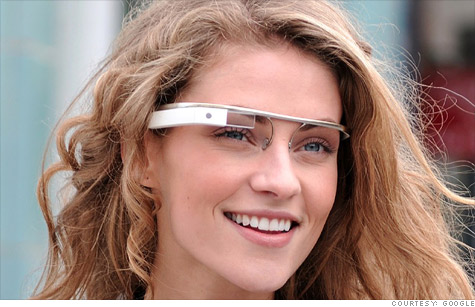
3.) I just have recently heard of "Google Glasses": click here to read about them
When I think of the future, this is exactly what I think of. These glasses are basically a computer right in front of your eyes. I can't even imagine what kind of effect this would have in schools! If these actually became popular, there'd be problems even getting students to engage with each other anymore or peeling their eyes away from the computer for a second. Like always, teachers would have to adapt their instructional plans.
A Shift in Perspective
Throughout this course, we have read many chapters and read about different ideas, but this one still stands out to me the most:
Though I believe to be technologically savvy, my concerns are that the things I am savvy in will become irrelevant by the time I am ready to teach in my own class. I grew up teaching myself about HTML and coding, then started using blogs like Livejournal and posting in online communities and forums. My interests evolved and changed overtime--Myspace was a big hit for me, as well as a website called Purevolume, where I would research new music artists. After that, I became interested in Facebook, but also about Flickr and Tumblr. Today, I enjoy exploring many applications such as Photoshop, Gimp, iMovie, podcasts, etc. I can only hope that I will keep embracing my own curiosity for technologies, and perhaps even know a thing or two that my students do not know about! My Visual Arts Workshop class has been extremely beneficial in helping me understand how to use these technologies I love so much for the betterment of my classroom. I use iMovie to create videos about artists and also how-to videos. I've created a podcast with a mock "interview" of an artist, and have even begun the process to starting my own website! (If you're interested in viewing, click here). I have also started the process to making a professional portfolio online which has lesson plans, and my videos on there.
I don't believe that I am a "digital native", as I didn't grow up knowing about technology as young as students do today. I didn't receive a cell phone until sophomore year of high school! But I agree that it is important for teachers not to frequently revert to past practices. I have the ability to critically reflect on technologies and become more fluent in my use of them in the classroom. This class has been a great start in this process to understanding what is suitable and ways to go about making it happen in the future.
My Video on Jean-Michel Basquiat: Could be used if I was not in class that day, or is an example assignment of what my students could do rather than writing a biography of the artist:
"The challenge lies in the differences between teachers and students. Today's students may be what Marc Prensky refers to as digital natives who have established relationships with technology since infancy and think and process information differently than their predecessors. In contrast, Prensky identifies their teachers as digital immigrants who may adopt the use of new technologies but frequently revert to past practices and skills that are foreign to their students. At the same time, while students may possess more advanced technological skills than their teachers, their abilities to critically reflect upon the technologies and their associated media texts are less established. As teachers become more fluent in their uses of technology, they are more able to focus on cultivating critical thinking and decision making among young people" (Rethinking Technology in Schools, 53).
I believe this sums up the whole purpose of this class quite well...
I don't believe that I am a "digital native", as I didn't grow up knowing about technology as young as students do today. I didn't receive a cell phone until sophomore year of high school! But I agree that it is important for teachers not to frequently revert to past practices. I have the ability to critically reflect on technologies and become more fluent in my use of them in the classroom. This class has been a great start in this process to understanding what is suitable and ways to go about making it happen in the future.
---
My Video on Jean-Michel Basquiat: Could be used if I was not in class that day, or is an example assignment of what my students could do rather than writing a biography of the artist:
NY Times Article: "For Young Latino Readers, an Image Is Missing"
link to article: http://www.nytimes.com/2012/12/05/education/young-latino-students-dont-see-themselves-in-books.html?adxnnl=1&ref=education&adxnnlx=1355261509-M3ZSeD6aLLZFpyYTfyEH8w
This article, titled, "For Young Latino Readers, an Image is Missing", by Motoko Rich, is an article I stumbled on while at work on December 4, 2012. Admittedly, upon first click I felt that I would not be interested in this piece, as I thought the title was pretty straight forward and summarized the entire article for me already. I could not have been more wrong.
As I continued reading, it hit me that this problem in schools could also transfer over to other technologies as well, such as videos, songs, etc. With "nearly a quarter of the nation's public school enrollment made up of Hispanic students" (Rich, 1), I have to be more in-tune with the books, illustrations, and videos I am using in my classroom. I can admit that I am naturally inclined to choose videos that I relate to personally and that this is a habit I will have to break as I continue on to become a teacher. I always stress how important it is to understand your students, but it is also important to be aware of what I am trying to teach them and how this information may or may not apply to them. Being white, I mean to be inclusive of all races, genders, and ethnicities so that all walks of life are fully represented, but am certain that this will take time for me.
"...those with human characters rather than talking animals or wizards — include the Junie B. Jones, Cam Jansen, Judy Moody, Stink and Big Nate series, all of which feature a white protagonist. An occasional African-American, Asian or Hispanic character may pop up in a supporting role, but these books depict a predominantly white, suburban milieu" (Rich, 2). Growing up, I remember books such as Junie B. Jones, and Jillian Jillian Jiggs. No books that I recall showed different locations or cultures. It is important for students to be able to connect to what they're reading, and sadly, I don't believe this is happening in a lot of schools currently after I read this article.
After reading, I began searching the Internet for videos that may be more relatable for these young students. One of my favorites is called "Get Ready for Gabi", a video done in "Spanglish" and can be viewed here:
Another is called "Captain Cheech", also shown below:
Not only are these good examples of books that could be used in the class, it's another way to introduce technology into the classroom!
This article, titled, "For Young Latino Readers, an Image is Missing", by Motoko Rich, is an article I stumbled on while at work on December 4, 2012. Admittedly, upon first click I felt that I would not be interested in this piece, as I thought the title was pretty straight forward and summarized the entire article for me already. I could not have been more wrong.
As I continued reading, it hit me that this problem in schools could also transfer over to other technologies as well, such as videos, songs, etc. With "nearly a quarter of the nation's public school enrollment made up of Hispanic students" (Rich, 1), I have to be more in-tune with the books, illustrations, and videos I am using in my classroom. I can admit that I am naturally inclined to choose videos that I relate to personally and that this is a habit I will have to break as I continue on to become a teacher. I always stress how important it is to understand your students, but it is also important to be aware of what I am trying to teach them and how this information may or may not apply to them. Being white, I mean to be inclusive of all races, genders, and ethnicities so that all walks of life are fully represented, but am certain that this will take time for me.
"...those with human characters rather than talking animals or wizards — include the Junie B. Jones, Cam Jansen, Judy Moody, Stink and Big Nate series, all of which feature a white protagonist. An occasional African-American, Asian or Hispanic character may pop up in a supporting role, but these books depict a predominantly white, suburban milieu" (Rich, 2). Growing up, I remember books such as Junie B. Jones, and Jillian Jillian Jiggs. No books that I recall showed different locations or cultures. It is important for students to be able to connect to what they're reading, and sadly, I don't believe this is happening in a lot of schools currently after I read this article.
After reading, I began searching the Internet for videos that may be more relatable for these young students. One of my favorites is called "Get Ready for Gabi", a video done in "Spanglish" and can be viewed here:
Not only are these good examples of books that could be used in the class, it's another way to introduce technology into the classroom!
Monday, December 3, 2012
Interactivity #5
The teacher I interviewed is a female art teacher who teaches at Lenape Valley Regional High School in Stanhope, New Jersey. She teaches all grade levels and several different courses, including photography and a class called "Art for the School & Beyond" which focuses on projects that give back to the community and school system. This teacher did not seem extremely knowledgeable with the NETS, stating that she had possibly heard about them through a grad course she had taken. Her initial reaction was a sense of familiarity, but was not able to pinpoint exactly where she may have learned about them and was not able to recall offhand what they were about.
She does not believe that her particular school or school district has begun to implement the NETS for students and stated solely that they are required to meet a computer requirement to graduate. When asked what resources should be used in order for the transition into NETS to go smoothly, she replied:
“I would say both professional development and funding. Teachers need the training to help their students gain the knowledge and skill necessary to meet these standards. For teachers that teach courses that utilize technology such as myself, I do not think it would be very difficult to help students meet these standards.”
To increase students' proficiency and media literacy, students have a variety of computer related courses that they can choose from. There are four courses at Lenape that students can take to earn computer literacy credits- these include Digital Photography, Computer Design, Advanced Computer Design, and Communication and Graphics Design. There are also computer courses offered in business, music, etc. I had the privilege to observe this teacher’s classroom before and watched her use several technologies in her classroom for both her and her students including computers, digital cameras, SmartBoard, and a projector.
Personally, I was not surprised with the teacher’s responses. This teacher uses many technological tools in her classroom, and though maybe not familiar with the NETS, still follows some of its guidelines. I believe that many teachers are not familiar with the NETS. As a future educator, in order to speak to others within my school about the NET-S and NETS-T, I would like to become more familiar with them which will ultimately make me feel more comfortable discussing them with my colleagues. The NETS could be brought up through school meetings and lesson plans, or even more casually by simply asking teachers if they’re familiar with them.
Link to my spreadsheet:
https://docs.google.com/spreadsheet/ccc?key=0AngLn3bH0AEKdEg2UlpTcURQcE1qNWZSS0dYVEQ1SXc
Subscribe to:
Posts (Atom)